
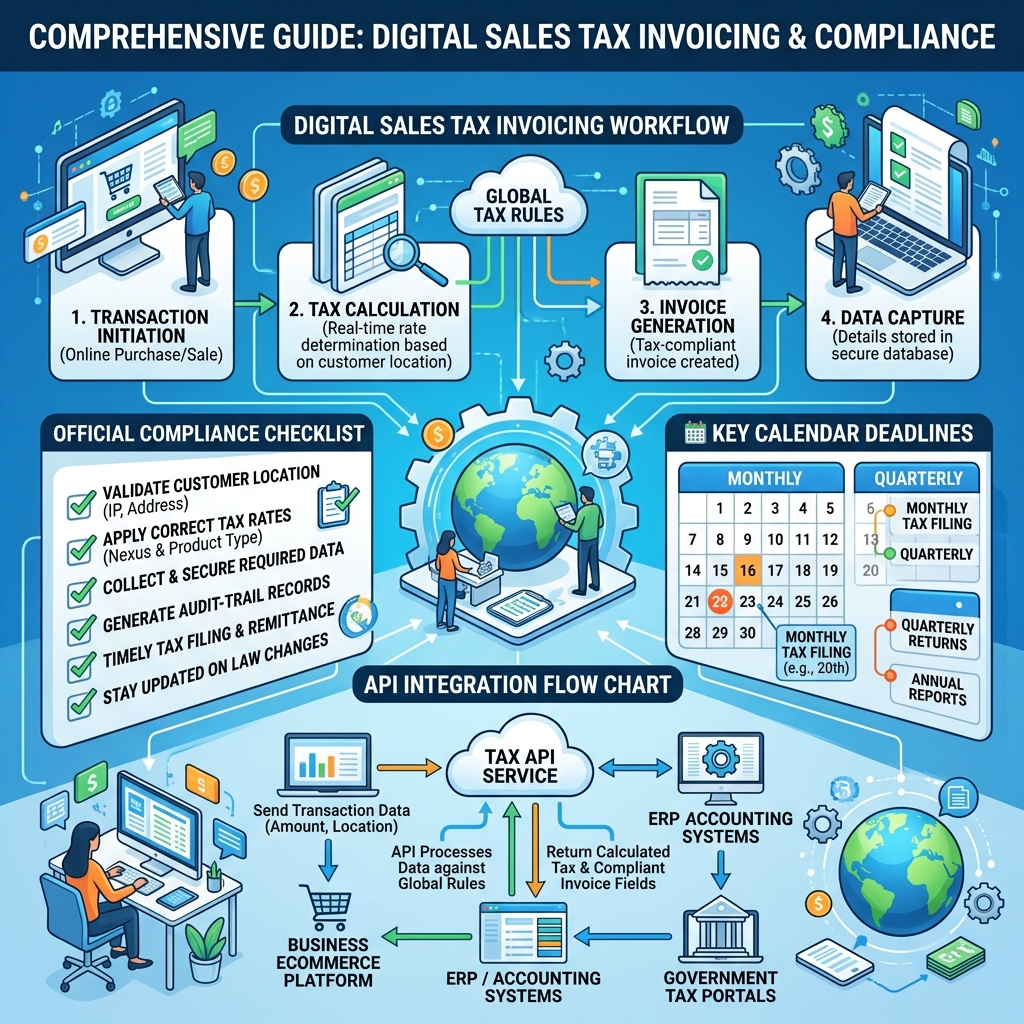
Digital Invoicing & FBR: Complete Guide — SROs, Extensions, Integration, Software & Practical Steps
A deep-dive long-form guide covering everything about digital invoicing FBR expects: SROs, PRAL integration, deadline changes, digital invoicing software, registration, login, download, notifications and practical steps to stay compliant.

- What is digital invoicing (and what is digital invoicing in FBR)
- Why FBR introduced digital invoicing & the role of PRAL
- SROs & digital invoicing: what to watch for
- Digital invoicing FBR deadlines, extensions & notifications
- Software & digital invoicing FBR software: options & selection guide
- Integration: digital invoicing FBR integration with ERPs and POS
- Practical: registration, login, download, and submission workflow
- Common errors, helpline, FBR logo and printing requirements
- Checklist & next steps
1. What is digital invoicing? — and what is digital invoicing in FBR
Digital invoicing is the electronic creation, validation, and submission of sales invoices in a structured digital format so tax authorities can receive, validate, and store invoice information in real time. When we say what is digital invoicing in FBR, we refer to Pakistan's mandatory process where businesses must submit invoice data to FBR's Digital Invoicing (DI) system via PRAL/PRAL-supplied APIs. The goals are transparency, easier audits, and near-real-time tax reporting.
At a practical level, digital invoicing FBR means:
- Generating invoices in an FBR-compliant JSON format.
- Validating the JSON using the DI API (validate endpoint).
- Posting the invoice using postinvoicedata endpoints and receiving an FBR Invoice Number plus a QR code for printing.
Quick note: In many implementations the digital invoicing system will also store copy of the submitted payloads and FBR responses locally for audit and reconciliation.
2. Why FBR introduced digital invoicing & the role of PRAL
The Federal Board of Revenue (FBR) has been progressively moving to real-time reporting to reduce tax leakage and increase automation. PRAL (Pakistan Revenue Automation Limited) provides the underlying technical infrastructure and APIs for the DI system — often referred to as PRAL gateways or DI APIs. If you see references to digital invoicing fbr pral they are about the same integration point: your software talks to PRAL endpoints that forward the validated invoice data to FBR.
Benefits for businesses and the FBR include:
- Faster validation and fewer manual corrections
- Automatic retrieval of applicable SROs (statutory regulatory orders) and tax rates
- Instant issuance of FBR invoice numbers and QR codes for printing
3. SROs & digital invoicing: what to watch for (digital invoicing fbr sro / digital invoicing sro)
Many rules for tax rates and special cases are contained in SROs. When you submit an invoice using digital invoicing FBR, the invoice line items may need SRO references to correctly handle exemptions, reduced rates, or fixed-notified values. Terms you will encounter include sale type, sroScheduleNo, sroItemSerialNo and HS codes.
Examples of SRO-related scenarios:
- Zero-rated goods (Fifth Schedule) — often need SRO links.
- Exempt goods (Sixth Schedule) — must be flagged so tax calculation is 0%.
- Reduced rates (Eighth Schedule) — special rate application.
Tip: Your digital invoicing software should provide fields for sroScheduleNo and automatically map HS codes to SRO entries when necessary. This helps meet the digital invoicing fbr sro requirements during validation.
4. Deadlines, extensions & notifications (digital invoicing fbr deadline / date extension / notification)
FBR issues deadlines for mandatory roll-out by sector or taxpayer class. Governments sometimes announce a digital invoicing fbr extension or a digital invoicing fbr date extension allowing more time for certain taxpayers. Keep an eye on official FBR notifications and SROs for extension details.
How to stay updated:
- Subscribe to FBR notifications (email / RSS) and PRAL announcements.
- Use a software provider that surfaces digital invoicing fbr notification messages in your dashboard.
- Follow official channels for urgent deadline updates to avoid fines.
Pro tip: Many businesses confuse system rollout dates with enforcement dates. Always check the SRO and PRAL announcement for actual enforceable deadlines.
5. Choosing digital invoicing software (digital invoicing fbr software / digital invoicing software)
Picking the right platform matters. Whether you choose a SaaS product, a plugin for your ERP, or a custom integration, ensure the solution supports:
- PRAL DI API endpoints (validate & postinvoicedata)
- HS code & SRO mappings
- QR code generation & FBR logo placement for printing
- Audit logging and payload storage (for legal compliance)
- Bulk submission and retry logic for API errors
Checklist — software features to look for:
- Built-in digital invoicing fbr integration with PRAL
- Automatic tax calculation and dynamic rate lookup
- URL-based login, user roles, and secure keys for API access (digital invoicing fbr login)
- Downloadable reports and submission logs (digital invoicing fbr download)
- Easy onboarding and registration process (digital invoicing fbr registration)
6. Integration: digital invoicing FBR integration with ERPs and POS
Integration can be performed in several ways based on your system architecture:
- Direct integration (API): Your ERP constructs the required JSON and calls PRAL endpoints (validateinvoicedata & postinvoicedata).
- Middleware / Adapter: A small service translates your ERP format to FBR JSON and manages retries.
- SaaS connector: A third-party tool (SaaS) that accepts CSV/Excel and handles the FBR API submission.
Technical tips for integration:
- Cache and periodically sync reference data like UOM and rate lists from PRAL to minimize real-time lookups.
- Implement idempotency: ensure invoices are not posted twice by tracking invoice reference numbers locally.
- Log both request payloads and FBR responses for audit and to resolve any digital invoicing fbr error codes.
7. Practical steps: registration, login, download, and submission workflow
Here’s a practical step-by-step workflow every business should follow to implement digital invoicing:
Step A — Registration & Setup
- Complete digital invoicing fbr registration procedures as required by PRAL/FBR (some providers require internal onboarding).
- Generate and securely store the API credentials — supply token(s) in your app header as
Authorization: Bearer <token>.
Step B — Invoice Creation & Validation
Create the invoice in your system and then call the validate endpoint to pre-check all fields. Validation will detect missing HS codes, invalid rates, or SRO mismatches.
Step C — Post Invoice to FBR
After successful validation, call the postinvoicedata endpoint. Save the returned FBR Invoice Number into your invoice records and generate a printable version including the FBR logo and QR code.
Step D — Download & Reporting
Use the platform to download submission logs, invoices, and reconciliation reports (digital invoicing fbr download). Maintain these records for audits.
Many systems also provide a manual “resend” or “revalidate” option if the initial attempt returned an error.
8. Errors, helpline & practical troubleshooting (digital invoicing fbr helpline)
Common validation errors often include missing HS codes, invalid UOM, or a mismatch in tax calculation. FBR/PRAL responses return error codes — capture those and add user-friendly messages to your UI.
If you need help:
- Contact your software vendor — they should have a support channel to translate FBR error codes into human-oriented guidance.
- Use PRAL documentation and sandbox to test scenarios.
- For official support, seek digital invoicing fbr helpline or PRAL support channels (listed on PRAL website).
Important: Never ignore FBR error codes. They are your primary cue for correcting invoice payloads before resubmission.
9. Printing & the FBR logo (digital invoicing fbr logo)
Once FBR returns an invoice number, the printable invoice should include:
- FBR-issued invoice number
- QR code
- Seller & buyer identifiers (NTN/CNIC)
- Clear tax breakdown with applied SRO references
- FBR logo — follow any brand placement guidance provided by FBR or the DI API documentation
10. Frequently asked practical questions
Q: What if I already use an ERP?
Most ERPs can be integrated using middleware or built-in connectors — the key is mapping invoice fields (hsCode, valueSalesExcludingST, rate, saleType). This is a typical digital invoicing fbr integration scenario.
Q: How do I get the FBR digital invoicing login?
The login and access model depends on whether you use a third-party SaaS provider or you integrate directly. SaaS providers offer a dashboard login; direct integrations rely on API tokens and admin UI inside your ERP (search for digital invoicing fbr login in vendor docs).
Q: Is there a download for the API documentation?
Yes — PRAL/FBR publish DI API documentation and JSON examples — look for digital invoicing fbr download or DI API technical specs (some vendors also include a downloadable sandbox JSON pack).
11. Audit trail, storage & legal compliance
Store every request and response securely. Regulations commonly require preserving invoice data for a specified number of years. Ensure you have:
- Immutable logs (or well-audited backups)
- Retention policy aligned with tax laws
- Exportable reports for auditors
12. Real-world implementation checklist (quick go-live checklist)
- Choose a reliable digital invoicing software or plan the integration architecture.
- Register for PRAL access and secure your tokens (digital invoicing fbr registration).
- Sync reference data (UOM, rates, SRO lists) from PRAL to your system.
- Map product HS codes and test validation scenarios in the sandbox.
- Implement error handling and retries for postinvoicedata.
- Prepare invoice print template with FBR logo and QR placement (digital invoicing fbr logo).
- Train operations staff to respond to FBR validation errors and notifications.
13. Advanced topics: bulk submission, async retries & performance
High-volume businesses should consider bulk submission and asynchronous processing. Implement a queue system and batch postinvoicedata calls while still validating each invoice payload. Use exponential backoff for 500 errors and capture failed items for manual review.
14. Staying informed — notifications & updates
Subscribe to PRAL and FBR feeds for digital invoicing fbr notification. Have your software surface banners for urgent regulatory changes (SRO updates, extended deadlines or new rate lists).
Conclusion — Why adopting digital invoicing now is the best practice
Digital invoicing transforms compliance from a periodic burden into a continuous, automated workflow. With proper software, integration, and procedures, you’ll minimize errors, avoid fines, and provide transparent transactional records for your business. Whether you search for digital invoicing system fbr or a vendor with best-in-class digital invoicing fbr software, choose a partner who understands PRAL, SROs and practical tax workflows.
If you want, our team can run a sandbox test for your top 10 invoice scenarios and provide a concise implementation plan — reply or click the contact link at the bottom to get started.